
17-Feb-2025
Artificial Limits Imposed by Microsoft
I don't usually do product reviews, but since Microsoft Dynamics 365 has intruded on my life over the last six years, I think others may benefit from what I, and the people I work with, have learned.
The Microsoft Dynamics 365 promotional video is a slick, virtual-reality-inspired, fantastical work, in which I can find no relationship to actual reality. The closing line is "No Limits". Let's bear that in mind...
From the video, you might expect the user interface to look like this:

What you get is this:
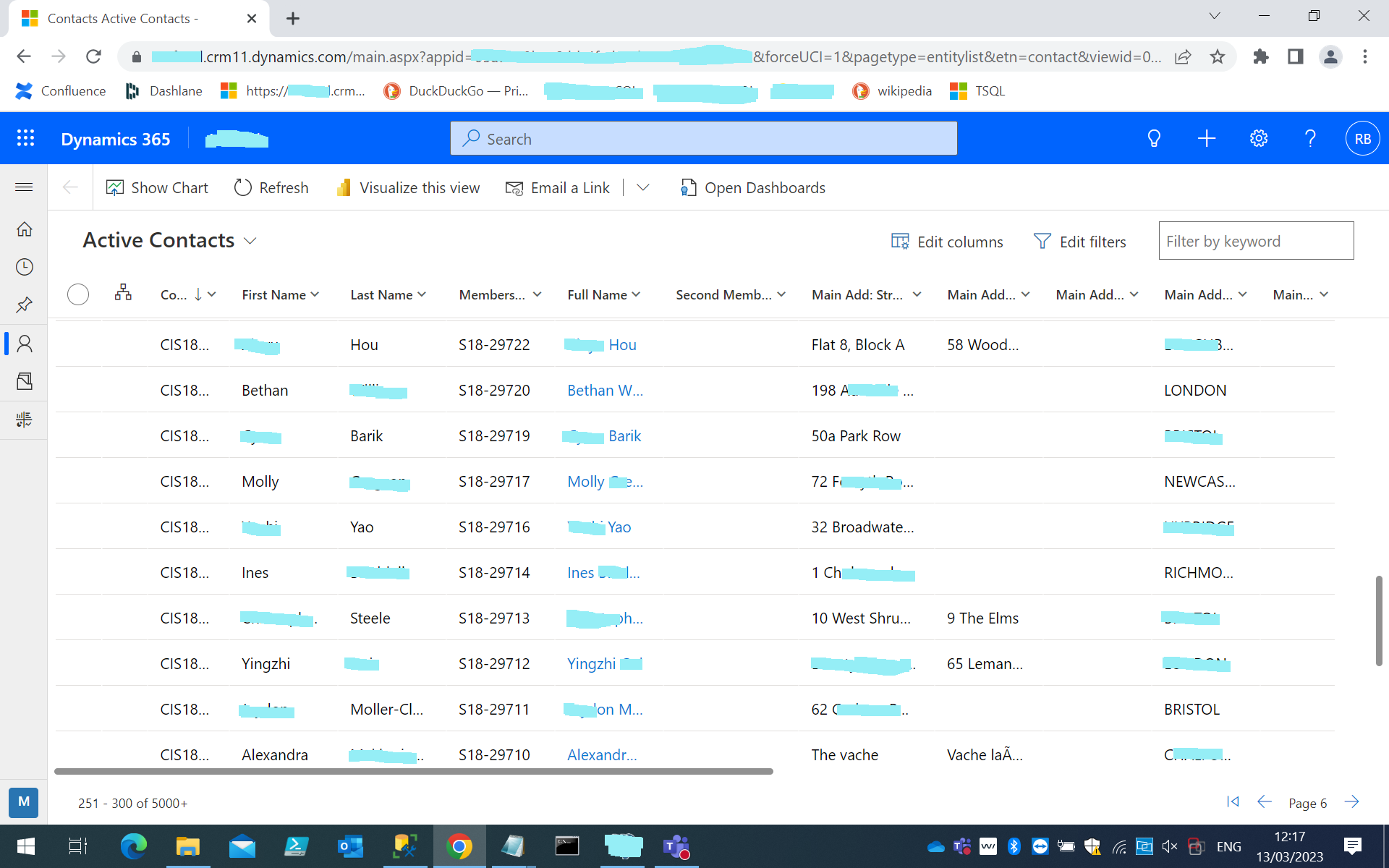
I have added the pale blue blobs, of course, to protect the identity of the real people represented in this real Dynamics CRM system. But you can still see the abbreviated headings, and the abbreviated data. In the real system you can enlarge each column, but that's pretty tedious, and anyway you have to scroll sideways for miles to see the whole record. You might like to use this as a quiz to identify all the user-interface crimes that are illustrated in this one screen.
Dynamics 365 consists of:
The Dataverse appears to be some sort of Data Lake. You can access it through Microsoft SQL Server Management Studio (MSSMS) as a "Tabular Data Stream" (TDS). This provides a severely hobbled SQL interface from which many SQL features are missing. The MSSMS Object Explorer provides incomplete and inaccurate metadata, as detailed below. Microsoft "Common Data Model" is also positioned as part of the Dataverse.
"Use Common Data Model to develop modern solutions, applications, and analytics that share a common understanding of your business data. Expand insights with a standard schema that enables rapid unification of data."
This sounds good, but it is nonsense. A Common Data Model is a marketing myth, and the Microsoft one is more so than most (because most common data models are at least industry-specific). There are several reasons why a common data model is a bad thing:
A Common Data Model is always a disadvantage, not an advantage.
These general points are borne out in the implementation that I have been involved with, at a major UK charity, over the last year. This is a Customer Relationship Management ("CRM") system, so the most important object in the databases is the "contact" table which holds current, prospective and past "customers" (actually "supporters" for the charity).
In the Dataverse contact table there are 392 columns, only 103 of which are used for the charity. So the "common understanding" of a contact is about 26% relevant to the charity. In fact it is worse than that because, as we shall see below, several of the column values are duplicated throughout the record.
Microsoft does supply "Industry Accelerators" and we have the "Non-Profit" Accelerator. "Non Profit" is an American term for something which does have some similarities to a UK Charity. Not very similar though: we have been able to use 3 out of the 78 "Non-Profit" tables.
There are 734 tables in the current Dynamics implementation for the charity. Of these 248 have data in them, leaving 486 empty, possibly never to be used.
There are 77 custom tables for the charity, on top of the 78 "Non-Profit" extension tables.
The Common Data Model is not very common at all.
As well as not being very relevant, the Common Data Model is badly designed. The performance and disk-space numbers (below) confirm this.
Some of this gets a bit technical. I'll try to explain as I go along.
The charity's data is not big, about 50GB. They have about 2 million contacts and about 80 million donation records going back over 30 years. To give some idea of what I mean by "not big", several finance and telephone companies in the UK have tens of millions of customers and billions of transactions.
When we started loading our 50GB of data into Dynamics, we found that the database size taken up by each table was between 10.7 and 22.1 times its size in our original database - that's a big increase.
I had a deeper look at the contact table in the Dataverse to try to see where the bloat was coming from. This is not the complete answer but there are some clues:
As a point of comparison, the supporter record we were loading from, has an average size of 145 bytes per record.
The contact record in Dynamics 365:
"Because GUIDs values are long and obscure, they are not meaningful for users. If randomly generated GUIDs are used for key values and you insert a lot of rows, you get random I/O into your indexes, which can negatively impact performance. GUIDs are also relatively large when compared to other data types. In general we recommend using GUIDs only for very narrow scenarios for which no other data type is suitable." [my emphasis]As with almost all aspects of good database design, the "Dataverse" team chooses to do the opposite.
And here's a good example of the problems caused by GUIDs
The address columns form a group that is repeated three times in each record. Inside each address block there are three telephone numbers, another repeating group. This breaks the First Normal Form rule twice. Database Normalisation is not some fussy application of arbitrary rules. Normalisation is what skilled database developers do because it makes the data model unambiguous, efficient and robust. Normalisation defends against several kinds of data quality error, removes duplication, and improves performance.
Another way that Microsoft wastes space will need a short explanation.
Way back when a big computer disk was 8 megabytes, we had to do all sorts of things to save space. A common technique was to use code tables for short text values. So if you had values: in this example colours, you could have a table:
| Code | Value |
|---|---|
| A | Aquamarine |
| B | Purple |
| C | Vermillion |
| D | Magenta |
| E | Lavender |
| F | Turquoise |
You could then store the letter for each colour in your detail records, and look up the letters in the colour table. If you had 100,000 records referring to colour, it would take 100,000 bytes to record a colour for every record. If you stored the colour names you would need 800,000 bytes. That was a big deal 50 years ago.
For sets of values that are short character strings, it makes much more sense to store the actual values and drop the code/value table altogether. And when you want to retrieve the data, you don't have to look up any codes. You lose a little bit of space and you gain processing time because you don't have to look up the values.
In Microsoft Dynamics, they still have codes and values, and they store both in every record, as well as in the code table. Often the code is longer than the value (just one case from a real system: 2763049 is the code for the character string "No").
Of course, if your code represents something that is a whole record, with many fields, then that thing should have its own record and the "code" will actually be the key of that record. This is normal database practice. Every financial transaction has the keys of the parties to that transaction, and the parties are stored in a separate table: each party stored once, with its key.
When Microsoft has codes which are the keys of records, they store the code and another field from the reference record (such as a customer's name) in the transaction record. They should store only the key, because they can find the name (and other details) in the record referenced by the key. Storing the name adds another column, wastes space and is duplication of data. Duplication is bad because if a name - an account-holder's name, for example - is stored in many places, then when it changes (as they do from time to time) it has to be changed everywhere. Very often, the change is not propagated, so we have conflicting data, and we may not know which is the correct, current version. This is a frequent cause of data quality issues, and causes customers irritation, or worse.
The number of columns in a table is important, not only because of the disk-space taken up, although, at Microsoft's prices, that does matter. The other problem is that every time you work with that table it is time-consuming and tedious. They don't group the columns logically and they don't define them in alphabetical order, although their naming is so bizarre that alphabetic order would not help much either, so when you want to find a column with a particular meaning you scan through, often hundreds of columns, trying to match the meaning with the idiosyncratic names. There is no data dictionary to explain the individual columns. They should minimise the number of columns through proper database design, name them properly, and provide a data dictionary.
Microsoft will suggest that there is no need for its customers to look into the database at this level, but their tools, aided by their implementation partners, give erroneous results, so someone has to try to figure out what is going on under the glossy but leaky covers.
Microsoft describes the Dataverse as "a smart, secure, and scalable low-code data platform".
I challenge all of this, but the "scalable" claim is clearly serious mis-selling. the charity's data is not large and the Dataverse cannot begin to cope with it.
The Microsoft sales pitch emphasizes:
Not one of these claims is true. I regard this as extreme mis-selling.
Overall, in the Dataverse, there are too many tables, too many indexes, too many columns, and too many relationships (foreign keys) . We have a revealing comparison. The charity has developed a data warehouse, which has the full volume of data, and is used in a fast interactive search tool. The accuracy and completeness of the data is tested by an automated process which runs after the data load that takes place every night. The accuracy and completeness are confirmed by the users of the search tool, who know their data and quickly spot anything missing or wrong.
The Data Warehouse was used as the definitive source for migrating the charity's data to the Dataverse. The data warehouse stored all the data that was initially used by the Dataverse, at a tiny fraction of the cost. There is no rational reason for making the data as large and complex as it is in the Dataverse, except - perhaps - to maximise Microsoft's revenue from disk storage.
| Dataverse | Data Warehouse | |
|---|---|---|
| Number of tables | 734 | 49 |
| Number of columns | 32,333 | 664 |
| Average columns per table | 44 | 14 |
| Number of indexes | 6,244 | 50 |
| Average indexes per table | 9 | 1 |
| Number of relationships | 8,435 | 130 |
| Average relationships per table | 11 | 3 |
As noted above most of the Dynamics tables are not used. The space impact is very low for empty tables, but the confusion this will cause to people trying to write reports on this database will be high.
The number of columns per table is a hint that these tables may not be properly normalized, and this is true in the few tables I have looked at more closely.
The number of indexes is excessive for a transactional database, and this almost certainly contributes to the poor performance.
The number of relationships again suggests lack of normalisation, and impacts performance.
Another wasteful feature is the storage of 1.5GB of "webresources" in the Dataverse. These are images, HTML, JavaScript and RESX Strings in multiple languages. These could all be stored in much cheaper file storage and that would be more appropriate.
A lesser sin (but still a sin) is the naming of objects. A typical example is a column called:
This is very hard to read, it should be:
(not that this field is likely be of any use to a UK charity user).
Underscores are used very occasionally, but then not consistently.
Amazingly, Microsoft publishes best practices which promote what, in fact, are terrible practices. I have had to fight through the results of these principles, which are a muddled, inefficient and enormously wasteful data management system. These best practices are anything but. They include "Dos" and "Don'ts" which appear arbitrary and are actually in conflict with good practice.
Overall, the poor database design increases the storage space that will be needed for the charity's data, and that combined with the extortionate price of disk storage for the Dataverse is very significant. There are further details about these points in the Database Design and Costs sections.
Once your Dynamics 365 system has been customised to meet the needs of your organisation, you need to get the data from your old systems into Dynamics 365. This means loading data into the Microsoft Dataverse.
In the organisation where I have been working, we prepared for this by building a data warehouse and we load data into this data warehouse from the old systems every night. In six hours we copy all the data from the old systems, we clean it, restructure it, and index it. We reconcile the row counts of the largest, most volatile tables to make sure that we copied everything and did not create any duplicates, and we run over 100 data quality checks on the resulting data to find any unexpected values, duplicates, broken links, and so on.
We did all this for 270 million records in six hours every night, between 1am and 7am, so we expected the load into Dynamics 365 to be comparable.
In fact, our implementation partner insists, after many challenges, discussions, and tests, that they can load only 1.8 million records per day. This means that migration will take 150 days, that is 5 months! What happens during this 5 months? Do we keep loading from changing databases until the new system is fully loaded? How do we deal with the changes that happen on the old databases while the new one is being loaded? Do we run the old systems and the new ones in parallel? Do we live without a system for 5 months? If we run the systems in parallel, how on earth do we keep both systems synchronised?
In fact, the implementation partner suggests that we load only the very recent data into Dynamics 365 and keep the rest in the data warehouse. So what happens when a supporter contacts us for the first time in 5 years? Their data will not be available in the new system. Supporters do generally contact us infrequently, when they move house, or want to change their direct debit or for other reasons. If we cannot find their records, that does not improve "the supporter experience".
The staggering inefficiency of the Dataverse, along with the cost, ensure that the Dataverse is not, in practice, scalable to even moderate data volumes.
This does sound incredible, so we checked with some other charities. One of these does keep most of its data outside the Dataverse in a separate data warehouse, mainly because of the cost. Another has implemented Dynamics 365 but operated with no computer system to manage its interactions with supporters for seven weeks while the migration was happening. Both of these charities have much smaller volumes than the one I have been working with.
If you had a car that could travel 10 miles on a full tank of fuel, it could possibly, by hopping from one petrol station to the next, travel the length of the country. It would cost a fortune and take a long time. Would you buy such a car? Would you buy Microsoft Dynamics 365?
Sometime later, after much discussion and contradictory advice, we were allowed to use Microsoft SQL Server Management Studio to access a near-real-time copy of the data, described as the Tabular Data Stream (TDS). This enabled us to see the data from the Dataverse as database tables. The Microsoft SQL Server Management Studio Object Explorer shows tables, columns, not-null constraints, primary keys, foreign keys and referential integrity constraints. When you select all the columns (select * from <table>) you get a few extra columns that are not shown in the Object Explorer. They are not shown in the metadata tables (sys.object, sys.column, etc.) either. When you check a column that is shown with a not-null constraint you will find null values in it. When you check the referential integrity constraints, you will find broken links. The defined constraints are blithely ignored. This allows damage in your data to go unrestrained. In the Dynamics systems I have seen, data quality breaches are rife. You won't get the annoying messages when you enter bad data, and that bad data will just sit there and fester, spreading through the multiple copies in the unnormalised, massively-duplicated data in the Dataverse, until your reports are completely unreliable.
I mentioned the "webresources" table above. This contains strings in multiple languages, so it seems that Dynamics 365 would have support for multiple countries and the location-specific characteristics of each country.
Most UK websites that have a form for entering your address, have an address-lookup feature - you type in your postcode and then choose your address from a short list of the possible addresses in that postcode. This saves typing and makes the address much more likely to be correct, and in a standard format, as preferred by Royal Mail. I expected Dynamics 365 to provide this as standard, but, on the implementation I have been working with, it does not even aspire to do so.
Default values and validation are not provided on the standard address form, but "County" and "Country/Region" are mandatory. Royal Mail recommends not using the County, and Country/Region should default to "United Kingdom" since that is where nearly all of the charity's supporters live.
Date formats default to American MM/DD/YY. They can be changed, but not to something that is unambiguous such as 11-Oct-2012. Depending on where you live, 11/10/12 could mean: 11-Oct-2012, 10-Nov-2012 or 12-Oct-2011. Or they could all be in the last century.
Remember the quote from Microsoft in the second paragraph of this article? "No Limits" it said.
The Dataverse size does not have a fixed limit, but the bloating of data between 10.7 and 22.1 times, exacerbated by the Microsoft disk-usage charges (see below) means that the cost is prohibitive for storing all of the charity's data.
In its marketing material Microsoft says, "A strong CRM solution is a multifaceted platform where everything crucial to developing, improving, and retaining your customer relationships is stored." But, in practice, Dynamics 365 can store only a tiny fraction of "everything crucial".
The same web-page says, "Simplify and improve even the most complex customer engagements with an array of CRM tools that scale to fit your needs." But Dynamics clearly does not scale, even to the modest size of the charity's data. The charity's 25-year-old system does a lot better than this! The old system needs to be replaced, but not with a system that is much less capable and much more expensive.
As well as limiting the size of the database, Microsoft limits how much you can use it. There are "entitlement limits" and "service protection limits".
Entitlement limits "represent the number of requests users are entitled to make each day. The allocated limit depends on the type of license assigned to each user".
Service protection limits "ensure consistent availability and performance for everyone. We [Microsoft] apply some limits to how APIs are used with Dataverse".
Dataverse has less functionality than Microsoft SQL Server. See the long list. Be sure to click on the "Not Supported" tabs.
One of these limitations is the blocking of metadata, which makes it impossible for many non-Microsoft tools to work with Dataverse. This is anti-competitive.
Details are on the Microsoft web page: Dynamics 365 Online Limitations
"The Dataverse TDS endpoint no longer has a hard maximum size limit. Instead, there's a fixed five (5) minute timeout." The same page goes on to say: "The five (5) minute timeout can be adjusted to two (2) minutes depending on the query complexity. For example, queries containing SELECT *, NESTED FROMs and/or JOINs will automatically adjust the timeout limit to two (2) minutes as those queries put too much pressure on the server". Poor little server! Try writing any real query on the hideously complex Common Data Model without "NESTED FROMs and/or JOINs". There are many cases where you might need to run bigger, or more complex, queries for further analysis. But Microsoft wants you to buy other products for that.
Microsoft also makes a "band-width" charge for copying data out of the Microsoft cloud. If you are thinking of implementing Dynamics 365, you need to consider how much data you will need to transfer from the Microsoft cloud. Do you have non-Microsoft tools that you use for selecting groups of customers, or some kind of analysis that is specific to your area? If so, you should calculate the costs before you go ahead with Microsoft products.
The charity that I have been working with, was advised, quite forcefully that they would need to buy several other products, for address-verification and de-duplication, for connecting to other systems, and even for storing data.
Looking at the promises from Dynamics 365, and its costs, I found it surprising how little it does out-of-the-box.
Microsoft has many ways of charging its customers, and they are not easy to understand.
Dataverse storage costs are split into three components: database records, files and logs. Disk space for files and logs is charged at £1.50 per gigabyte per month. But, for disk space for the Dataverse, the charity I have been working with is being quoted £21.20/GB/month. I know that we can buy disk space for another database system for only £0.65/GB/month. (This database also runs on the Microsoft Azure Cloud.) I do not see how the difference of 32 times the price can be justified, but that's the price and I have heard no attempt from Microsoft to justify the difference.
Some disk space for the Dataverse is included in the Dynamics 365 licence: 250MB per licensed user. Disk space beyond that is £21.20/GB/month.
The charity I have been working with has about 50GB of data. As noted above, this gets bloated by at least 10 times when loaded into the Dataverse, so that makes 500GB. Even with the per-user allowance, they are looking at over £8,000 per month, which is about £100,000 per year, just for disk space for the Dataverse. Microsoft is bloating the data and then charging an extortionate rate to store it. The data warehouse system can store the same data, on a highly reliable database service for less than £1,000 per year: 99% cheaper than Dynamics 365.
Dataverse Storage costs are just one element of the total costs for a Dynamics 365 system.
Dynamics 365 may be scalable in theory, but the cost and the performance make this completely impractical.
Many organisations have suffered from failed in-house development of new systems. But, unfortunately, the belief that an external partner would mitigate the risks has not been validated in practice. In contrast, in the charity that I am working with, an internal team has proved its ability to deliver a high quality, efficient, low cost, well-documented system. This team is devoted to the charity whereas the implementation partner is devoted to Microsoft.
Cost expansion is a constant threat from Microsoft and the implementation partner. In contrast, the internal team has been diligent in finding low-cost, robust, secure solutions.
It is possible that there will be staff turnover with an internal team. This will be minimised if they are given the resources they need, and if their skill and dedication are recognised, not only in words but also in management decisions that affect their work. In our case, the internal team has built superb documentation, which is a hedge against staff turnover.
The internal team has also been able to recruit outstanding new members who have become very productive contributors across all aspects of their work. Good developers want to do this kind of work.
An external partner will not necessarily be able to provide good support when the project has finally been delivered. The most-capable members of the partner's team, and those who have worked on the initial implementation, are unlikely to be available to the client when they are needed in future. We have witnessed other charities being abandoned, in one case for months, with key functionality not working.
With an external partner the client pays a premium for service that is not guaranteed to be better than that delivered by an internal team. The evidence suggests that it can often be worse.
Microsoft's habit of upgrading cloud software without giving clients the chance to test it first, has led to widespread problems and is a risk for the future.
Microsoft has also introduced sudden, large price rises, and this is a high-probability risk to the client. Just a couple of examples: https://www.formuspro.com/r/news-d365-data-storage-price-hike/ and https://www.ndynamics.com/blog/entry/understanding-microsoft-services-price-hike.
My unavoidable conclusion is that Microsoft Dynamics 365 is not fit for purpose.
It is not fit for the purpose advertised by Microsoft, and it is not fit for the purpose of the charity I am currently working with.
And one other thing:
The frequent competitor against Microsoft Dynamics 365 is Salesforce. I have seen a Salesforce bid, including a demo, and it was significantly more expensive that Microsoft's. I know people who use Salesforce and hate it. The Salesforce company is massively successful: it has huge profits, its CEO is a billionaire and it has a huge swanky building in downtown San Francisco. Salesforce clients paid for all this. I have no direct experience with the Salesforce software, so I cannot provide a detailed review as I have done for Dynamics 365. I would just say to anyone thinking of using Salesforce: be very wary. I cannot say that it is better or worse than Dynamics 365, but it seems very likely that you would run into similar problems of cost and complexity. I would hate to send people from the frying pan of Dynamics 365 into the fire of Salesforce.
My advice is to look for lower-cost solutions. There is certainly the possibility of getting a better solution for much less money.